PG9914- Battery Replacement

PG9914- Battery Replacement

When it is time to replace the battery in your motion detector, you will see an alert on your system panel, as well as a notification in the Alarm.com Mobile App.

The DSC PG9914 PIR Pet-Immune motion detector requires a 3-volt lithium CR123A battery, which can be purchased at your local hardware, mass retailer, or battery store.


Step-by-Step Instructions:

1. Locate the sensor with a low battery on either your system panel or in the Alarm.com Mobile App.

2. You can bypass the sensor on your panel or place you alarm on test mode from the app.

3. To open the cover, remove the locking screw from the bottom, then press the tab at the bottom of the sensor to remove the cover.
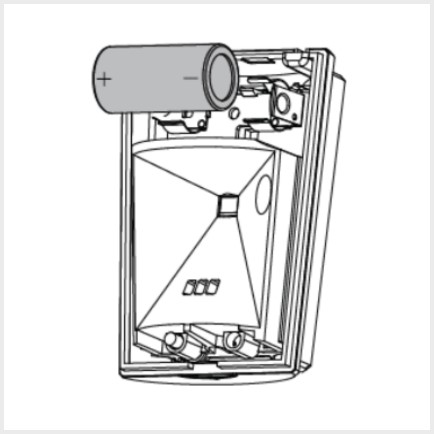
4. Remove and replace the 3-volt lithium CR123A battery.
DSC PG9914 Battery Replacement

5. Make sure the area where the batteries are stored is clean and there is no corrosion.

6. Put the cover back on starting with the opposite end from which it was opened. You should hear a snapping sound if it closes correctly.

7. Arm and disarm the system to clear the bypassed sensor or remove it from test mode.

8. Check if the low battery status has cleared or follow the link below for further instructions on clearing the error from the panel memory:


    • Related Articles

    • PG9303—Battery Replacement

      hen it is time to replace the battery in your door/window sensor, you will see an alert on your system panel, as well as a notification in the Alarm.com app The DSC PG9303 door/window sensor requires a 3-volt lithium CR2450 Panasonic battery, which ...
    • Vista—Replace Backup Battery

      Follow the instructions below to replace the backup battery in your system's panel. The Honeywell Vista panel requires a rechargeable (sealed lead-acid type) 12VDC, 4AH minimum battery pack rated for 24 hours, which can be purchased at your local ...
    • GC2/GC2e—Sensor Malfunction

      GC2/GC2e — Sensor Malfunction Your alarm panel performs a “roll call” every hour, sending a signal to all connected sensors to confirm they’re working properly. If a sensor fails to reply, the panel will display a Malfunction/Failure message, and you ...
    • IQ Panel 4—Sensor Malfunction

      Every hour, your alarm system sends a signal (called a roll call) to each sensor to confirm it’s working and reporting properly. If a sensor doesn’t respond, the system sends a failure signal to the control panel. You’ll then see an alert or ...
    • PG9303—Resolving a Malfunction

      Resolving Errors on a New Device: If this error occurs on a newly installed device, it is usually an indication that the sensor is too far from the panel to maintain a signal. Determine whether you are able to move the sensor closer to the panel, or ...